Seneca Careers · for candidates
Let employers see how you work.
Keep a private record of the questions you asked, the drafts you revised and the fixes you made. When you apply for a role, you choose which records that one employer sees, preview their exact page, and decide when access ends.
It helps most when your résumé is short, or when your best work happened in a class project nobody else will see.
- Invite-only pilot
- Free for candidates
- 18 or older
How it works.
Four steps. The first three are private. Only the last involves an employer, and only if you choose.
- 01
Sign in with your code
Sign in by email at vindicaseneca.com/careers, enter your invite code, confirm you are 18 or older, and switch on your private learning record. That gives no employer anything.
- 02
Bring your history
Export your chats from ChatGPT, Claude or Gemini and add them on the import page. The file is read in your browser and you pick which conversations to upload. Seneca keeps moments where you worked something out, in your exact words. Or write a moment yourself.
- 03
Look it over
Read each record the way an employer would. Add context where a quote alone would mislead ("this was a timed exercise"), and delete anything you don't want kept.
- 04
Apply, then choose
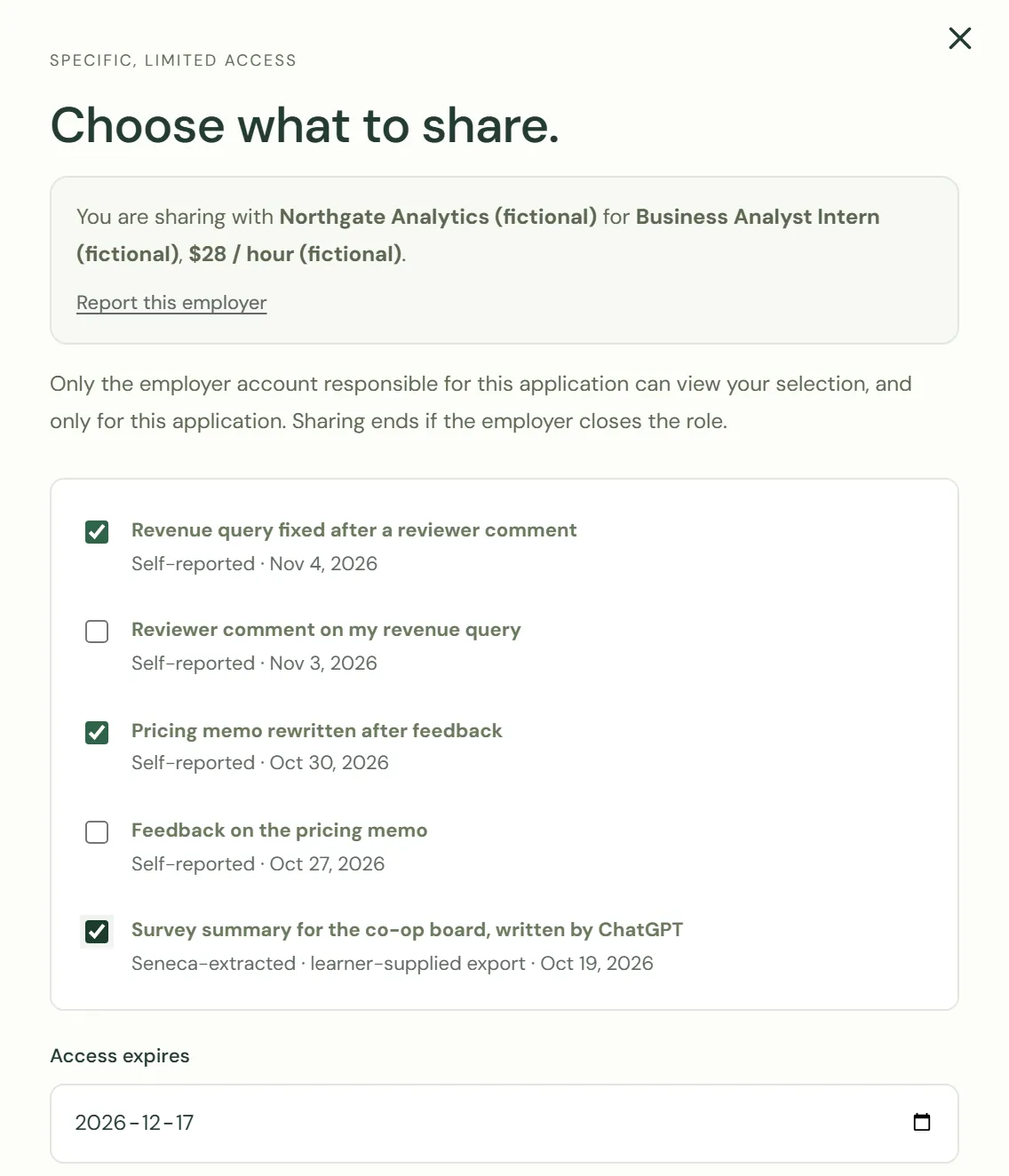
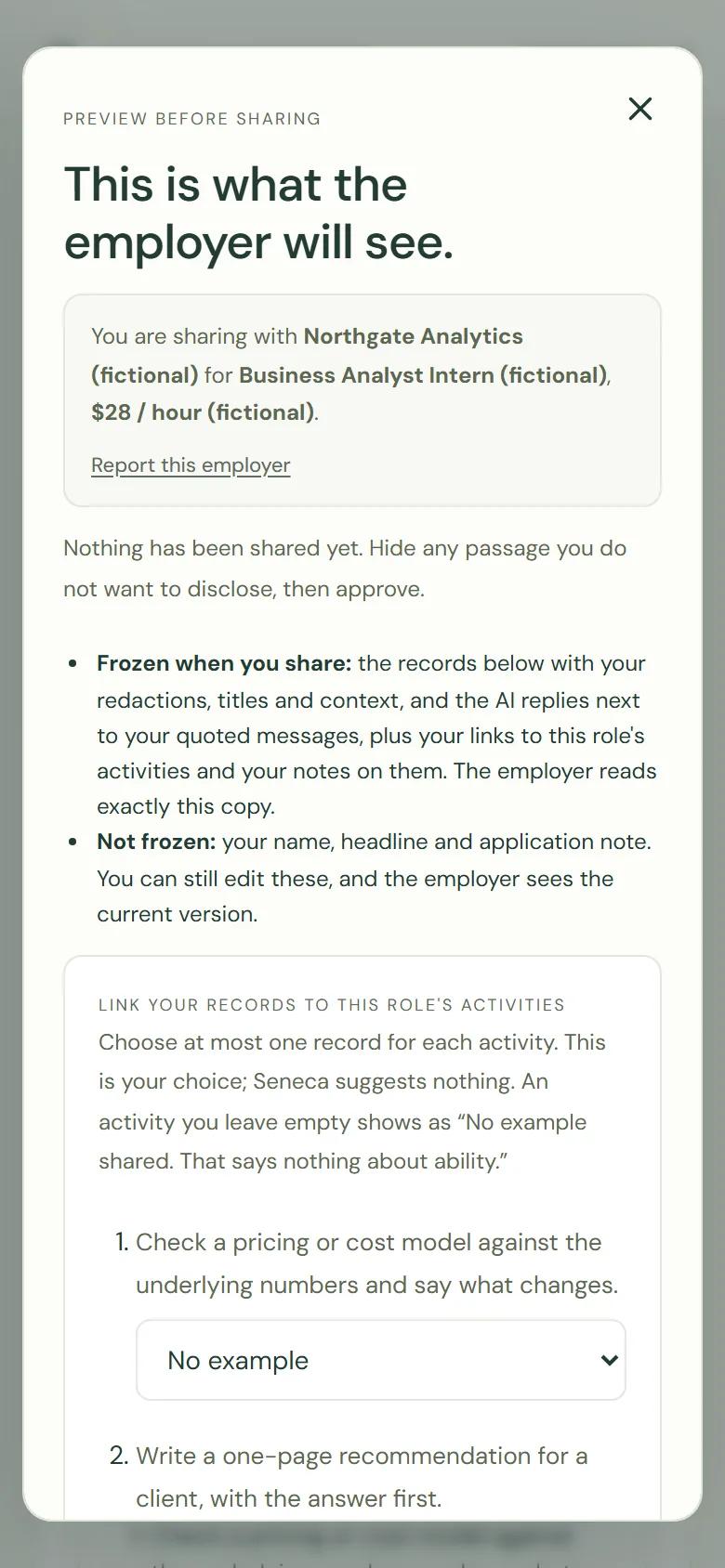
Apply with a short note. If you want, pick records for that employer, preview their exact page, hide any passage, and approve with an end date up to 90 days away.
A record shows the work, over time.
Records from different weeks show how your work changed: the first draft, the comment you got, the rewrite. One record is one moment. Several show how you learn.
- Your words, quoted exactly. Moments taken from a chat history quote only what you wrote.
- A plain label on every record: where it came from, who took part, and what one record cannot show.
- Your own context beside it, marked as yours, so a quote never has to speak for itself.
- Corrections count. A record of feedback you took on board is often the most useful one you can share.
You decide what travels. AI help stays visible.
What stays in your control
- Private by default. Importing or writing a record shares nothing.
- Each record, one employer, one role. You choose record by record for each application.
- Preview and redact. The employer's page is the one you approved, with [redacted] where you hid a passage.
- An end date, and a page that shows whether the employer opened your records, and when.
- Withdraw any time. The records leave the employer's view at once. What they already read can't be recalled, and we tell you that before you share.
- Leave entirely. Deleting your Seneca account deletes your profile, applications, messages, records and every share.
If you used AI
- The AI's replies stay beside your words, labelled "AI assistant". You can hide a name in them, but you can't remove them.
- If you asked and the AI wrote it, the record says so plainly.
- Employers are told that AI-assisted work doesn't prove independent ability. Share the records where your own thinking shows: the check you ran, the error you caught, the fix you made.
What employers never see
- Records you didn't share
- A score, rank or prediction about you
- A search over your records
What you leave out says nothing, and employers are told so.
What happens on the employer's side.
A handful of employers, each reviewed by a Seneca operator for the pilot. Reviewed means we checked who they are; we don't vouch for them as workplaces.
When you share
The records you chose open with your application, for that employer and that role only. The employer reads the copy you approved in the preview; a later edit reaches them only if you share again.
After they read
They can message you about a record. They give no score and fill in no rating. During the pilot, Seneca follows up with employers itself to learn whether shared work was useful.
If something feels off
An employer asking you to share "everything", or to send records outside Seneca, can be told no. Use "Report this employer" in the share dialog.
Questions candidates ask first.
Do I need to have used AI tools?
No. You can write moments yourself. An imported chat history is one way in, not the only one.
Is my chat history read by a person?
A model extracts moments from the conversations you upload. Nobody at Vindica reads your conversations unless you ask us to look into a problem with your import, and then only with your explicit consent.
Who else can see my record?
Only you, until you connect an app or share with an employer, and each of those is a separate choice you can undo. The privacy policy and retention schedule say the rest.
How long does it take?
Signing in and importing one export takes about ten minutes. Looking records over takes as long as you want to give it.
What does it cost?
Nothing. Seneca Careers is free for candidates.
Ready to start?
Sign in with your email, enter the invite code you were given, and bring one piece of your history in. No code yet, or a question? Email kevinchoi@vindicaseneca.com.